
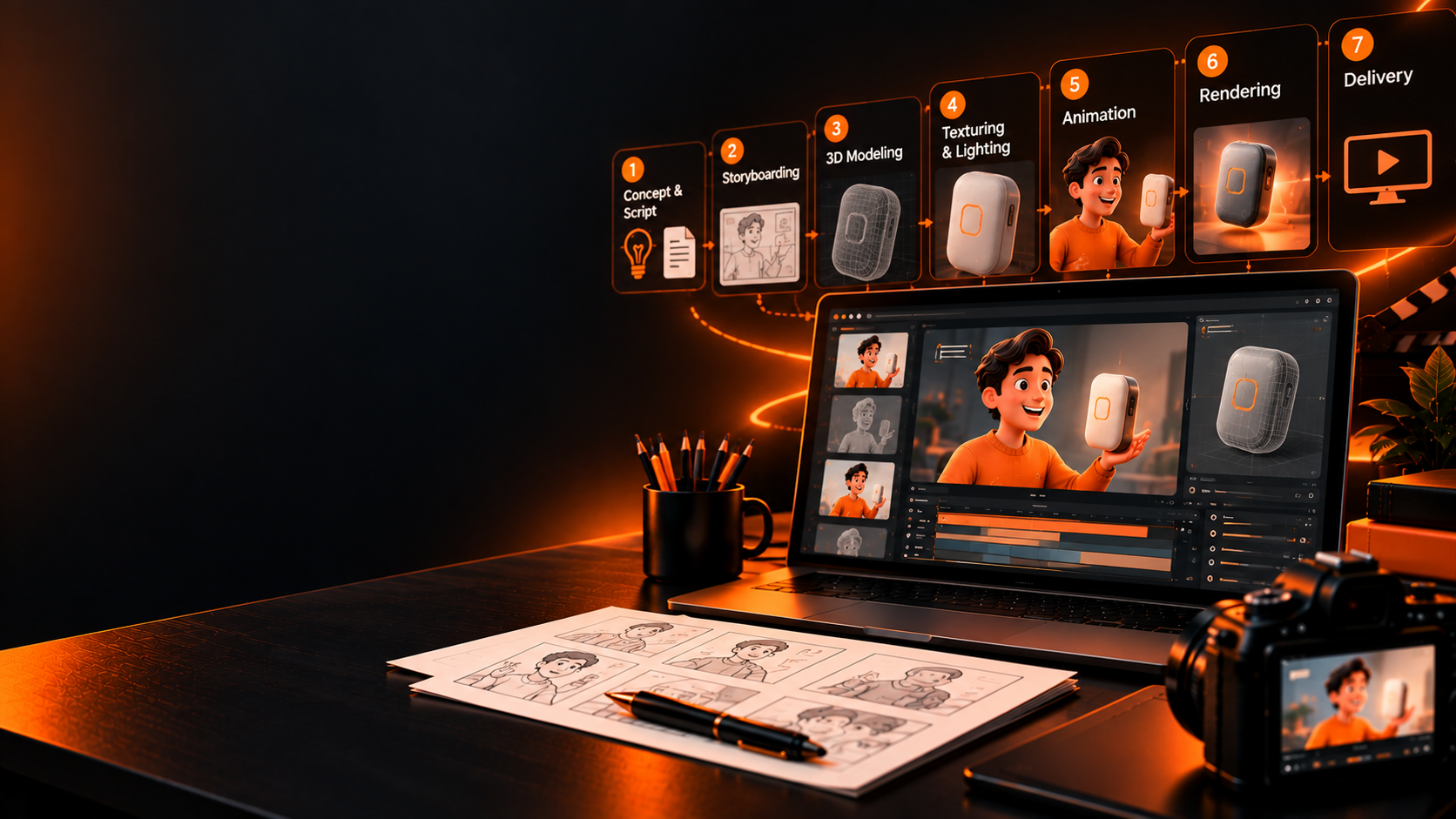

How to Make a 3D Animation Video for Your Product: Process, Timeline and Cost
Anshu Thakur
Oct 7, 2026, 5:53:20 AM

How to Make a 3D Animation Video for Your Product: Process, Timeline and Cost

Anshu Thakur · Updated October 2026 · 12 min read
14
3D product examples
4–6 wks
Typical timeline
5,000+
Videos produced
15+
Years B2W experience

A 3D product animation video builds your product as a digital model and moves a virtual camera around it, inside it and through it, so buyers can see how it works. The ones that sell pair those 3D shots with motion graphics: labels, callouts, data and interface screens that explain what the viewer is looking at. Making one takes eight steps, from script to final render, usually over 4 to 6 weeks. Below is the full process, what drives timing and cost, and 14 real examples from our studio.

What Is a 3D Product Animation Video?

A 3D product animation video is a short film built around a digital model of your product. Because the model exists only in software, the camera can go anywhere a real camera can't: through a casing, inside a valve, around a device as it's being used, or into the body where an implant does its job.

If 3D is more than you need, see how to make an animated explainer video in 2D, motion graphics or whiteboard.

For B2B products, 3D on its own rarely tells the whole story. A beautiful turntable shows what the product looks like. It doesn't explain why it matters. That's why we almost always combine 3D with motion graphics (often called 3D motion graphics), which is our core craft. The 3D carries the hero shots. The motion graphics carry the explaining: labels that name each part, callouts that point at the feature that matters, data that proves the claim, and interface screens that show the software side.

3D Motion Graphics: Why 3D and Motion Graphics Work Better Together

Facts don't win hearts, stories do. A spec sheet turned into a 3D render is still a spec sheet. What works is a story where the buyer's problem comes first and the product arrives as the answer, with each 3D shot doing one job in that story.

  • 3D shows. It makes a physical product real before anyone has held it, and it reveals what's hidden inside.
  • Motion graphics explain. They turn a feature into a benefit by adding the words, numbers and arrows the viewer needs.
  • Together they're cheaper than all-3D. Rendering every frame in 3D is slow and expensive. Mixing in 2D motion graphics keeps the budget on the shots that need it.

If you're weighing the two styles, our guide to 2D vs 3D animation covers the tradeoffs, and types of motion graphics shows what the 2D layer can do.

How to Make a 3D Animation Video: The 8-Step 3D Animation Process

Here's how to create a 3D animation video for a product, from first brief to final file, the same way we do it. The order matters, because every hour spent getting the script right saves days in rendering later.

  1. Brief and script. Agree on one viewer, one problem and one action you want them to take. Then write the voiceover. The script decides the length, and our explainer video benchmark shows most land between 60 and 120 seconds. See our explainer video script guide for how we write them.
  2. Storyboard. Sketch every shot and mark which ones need 3D and which can be motion graphics. This is where the budget gets decided. More on this in our storyboarding guide.
  3. 3D modeling. Build the product as a digital model. If you have CAD files (STEP, SolidWorks or similar), we start from those, which saves time and keeps every dimension accurate.
  4. Materials, lighting and styleframes. Give the model its surfaces (brushed metal, matte plastic, glass) and light it. We then design a few finished frames so you can approve the look before anything moves.
  5. Motion graphics design. Design the labels, callouts, icons, data visuals and interface screens that will sit on top of or between the 3D shots.
  6. Animation. Move the camera and the product: exploded views, cutaways, assembly sequences and in-use shots. The motion graphics are animated to land exactly when the voiceover names each feature.
  7. Rendering. The computer turns each 3D frame into a final image. This is the slowest step, which is why it comes after every shot is approved. Heavy scenes can take hours per second of video, so studios often lean on render farms or specialized GPU hosting to keep schedules on track.
  8. Sound, edit and delivery. Add the voiceover, music and sound design, then export the master plus the cuts you need: a 30-second version, silent social versions and stills for your website and sales deck.

Want the full picture of how a project runs? See our video production process.

How Long Does a 3D Product Animation Video Take?

A 60 to 90-second 3D product video with motion graphics usually takes 4 to 6 weeks. A simpler scope, with a CAD model ready and fewer shots, can be done in about 2 weeks. Four things move the timeline most:

  • CAD files. Having them can save a week of modeling.
  • Number of 3D shots. Every extra camera move adds modeling, animation and render time.
  • Render complexity. Glass, liquids and fine detail take far longer to render than flat surfaces.
  • Review rounds. Fast, consolidated feedback at the storyboard and styleframe stages keeps the schedule intact.

How Much Does a 3D Product Animation Video Cost?

At Broadcast2World, a 60-second video in our Premium style, mixing 3D product shots with motion graphics, typically costs around $4,200 to $4,600. A fully 3D production in our Flick style is about $8,100 for 60 seconds. A 30-second version costs roughly half, and a 90-second version about 1.3 times as much. The biggest cost drivers are the share of shots that need full 3D and how detailed the product is. For a full breakdown across styles, see how much animation costs.

14 3D Product Animation Examples (With Motion Graphics)

Every example below is our own work, grouped by the kind of product. Each one mixes 3D with motion graphics in a different way. Click any card to watch it, then read why it works and what you can borrow for your own video.

Group A · 8 Examples
Medical Devices, Shown Inside Out

Devices, implants and procedures where 3D shows what no camera can reach and motion graphics name every part.

Push2Spin CDL BD Breg
A
01
Push2Spin: Device How-To
3D + Motion Graphics 3:06 B2W Production

A step-by-step 3D walkthrough of a medical device used in fat-removal procedures, showing each stage of use in order.

Why It Works

The 3D model can be turned to the exact angle a clinician needs, so every step is clear without a single photo shoot.

Borrow This

For any device that needs instructions, build the how-to in 3D. One model gives you training, sales and support videos.

02
CDL: Custom Cardiac PET
Premium + 3D 1:45 B2W Production

A 2025 film for CDL Nuclear Technologies on its custom cardiac PET imaging, combining 3D equipment with motion graphics for patient care data.

Why It Works

Clean motion graphics carry the clinical detail, so the 3D shots can stay focused on the technology.

Borrow This

Let 3D carry the "what" and motion graphics carry the "why". It keeps a medical story easy to follow.

03
CDL: Mobile Cardiac PET Trailer
Full 3D 1:48 B2W Production

A 3D tour that takes healthcare providers inside CDL's mobile cardiac PET trailer, from the control room to the PET/CT scanner.

Why It Works

The camera walks the viewer through the trailer like a site visit, so a big capital decision feels concrete.

Borrow This

If your product is a space or a system, give the viewer a guided 3D walkthrough instead of a list of features.

04
BD: Touchless Plus Catheter Kit
Full 3D 3:52 B2W Production

A 3D procedure video showing clinicians how to use BD's Touchless Plus pre-lubricated urinary catheter kit, item by item.

Why It Works

Every component is modeled and labeled, so the steps are unambiguous in a way live-action rarely manages.

Borrow This

For procedure videos, label every item the first time it appears. It removes guesswork for the viewer.

05
Breg: QuantumOA Knee Brace
Full 3D 1:35 B2W Production

A 3D product explainer for Breg's QuantumOA osteoarthritis knee brace and its dynamic pull system.

Why It Works

Animated force arrows show the brace unloading the knee in the last 30 degrees of extension, which no photo could show.

Borrow This

When your product works through forces or motion, animate the force itself. It turns a claim into something visible.

06
MMJ Labs: Pain Relief Device
Full 3D 2:14 B2W Production

A 3D explainer that traces the science of drug-free pain relief, from gate control theory to MMJ Labs' vibration device.

Why It Works

It opens with the problem (the opioid crisis) before the product appears, so the device arrives as the answer.

Borrow This

Start with the problem your buyer already feels. Introduce the product only once they want a solution.

07
OrthAlign: Surgical Navigation
Infographic + 3D 2:13 B2W Production

A motion graphics explainer for OrthAlign's compact navigation technology for knee and hip replacement surgery.

Why It Works

Infographic motion graphics make the business case (accuracy, cost, space in the OR) alongside the 3D anatomy.

Borrow This

B2B medical buyers need the business case too. Put the ROI on screen next to the clinical story.

08
Ethicon: Legacy Film
Mixed Media 2:50 B2W Production

A mixed media film tracing Ethicon's history of surgical innovation since 1886, with 3D sutures and instruments.

Why It Works

3D product shots give a heritage story a modern finish, so 140 years of history still feels current.

Borrow This

Even a brand film can feature the product. A few 3D hero shots tie the story back to what you sell.

Have a device that's hard to explain?
We'll turn your CAD files into a 3D product video with motion graphics that shows exactly how it works.
Group B · 2 Examples
Industrial and Hardware Products

Physical products with hidden mechanics, where cutaways and exploded views do the selling.

3Flow LSP
A
09
3Flow: Fume Hood Airflow System
Full 3D 3:25 B2W Production

A 3D explainer for 3Flow's fume hood airflow system, showing how it cuts lab energy use without compromising safety.

Why It Works

Airflow is invisible, so the animation makes it visible with 3D particles and motion graphics data on energy use.

Borrow This

If your product changes something invisible (air, data, heat), animate that change. It's the proof buyers need.

10
LSP: One Stop Box
3D + Motion Graphics 1:38 B2W Production

A 3D product video for LSP's One Stop box, a universal outlet box for washing machines, ice makers, gas and drains.

Why It Works

Exploded views show every configuration from one model, so a product with many versions is explained in under two minutes.

Borrow This

For a product with many variants, build one 3D model and animate each configuration rather than filming them all.

Need a 3D product video for your next launch?
Tell us about your product and we'll show you which shots need 3D and which can be motion graphics.
Group C · 4 Examples
Technology and Infrastructure in 3D

Software, networks and lab systems, where 3D turns an abstract system into something you can see.

Telin Align Asigra Thermo Fisher
A
11
Telin: TAOI Subsea Cable System
Isometric 3D 1:23 B2W Production

A 2025 isometric motion graphics film for Telin's subsea cable system, built for AI models and cloud workloads.

Why It Works

Isometric 3D turns a global network into a clear map, and motion graphics show data moving across it.

Borrow This

Use isometric 3D when the product is a network. It shows scale without losing clarity.

12
Align: IT and Data Center Solutions
3D + Motion Graphics 1:36 B2W Production

A 3D explainer for Align that moves from the workplace to the data center and into the cloud in one continuous camera move.

Why It Works

A single journey through 3D spaces links services that would otherwise feel like a list.

Borrow This

If you sell several services, connect them with one camera path. It shows they work as one offer.

13
Asigra: Ransomware-Proof Backup
Full 3D 2:27 B2W Production

A 3D explainer showing how attackers target backups, and how Asigra's approach keeps data clean.

Why It Works

The threat is staged in 3D before the product appears, so the viewer understands the risk first.

Borrow This

For security products, show the attack before the defense. The solution only matters once the threat is real.

14
Thermo Fisher: Forensic Sample Extraction
3D + Motion Graphics 3:10 B2W Production

A 3D explainer for the Presto system co-developed by Thermo Fisher Scientific and Hamilton, automating forensic DNA extraction.

Why It Works

The 3D model of the instrument is paired with motion graphics that show throughput (96 samples in about an hour).

Borrow This

Pair your hero 3D shot with one hard number on screen. The image builds desire and the number builds trust.

Should You Make It Yourself or Hire a Studio?

You can learn to make 3D animation yourself, and for some jobs that's the right call. For a product video that buyers will judge your company by, it usually isn't.

  • Make it yourself if you need a simple turntable or a single shot for social, you already have a 3D artist on the team, and the deadline is loose.
  • Hire a studio if the video has to explain how the product works, a sale depends on it, you need a script and a story as well as the visuals, or you need several versions for different audiences and channels.

Planning to try it yourself first? Our guide to making animated videos is a good starting point.

Tools Studios Use for 3D Product Animation

Most studios work across three groups of tools. For 3D modeling and animation: Cinema 4D, Blender or Autodesk Maya. For motion graphics and compositing: Adobe After Effects. For rendering: engines like Redshift, Octane or Blender's Cycles, often on render farms. CAD files usually come in from engineering tools like SolidWorks.

Throughout a project, a video annotation service can help label scenes and add notes at each step, which keeps big productions organized and makes revisions easier.

Can AI Make 3D Product Animation Videos?

AI can now generate short 3D-looking clips from text or images, and it's useful for early concepts and mood boards. It still struggles with what product videos need most: accurate geometry, exact brand details and the same product looking identical from shot to shot. Most studios, including ours, use AI to speed up parts of the pipeline rather than replace it.

As AI becomes more deeply built into animation pipelines that rely on large datasets and automated tools, features such as AI threat detection play an important role in protecting creative assets, training data and production workflows.

The Takeaway

A 3D product animation video works when the 3D shows what the product is and the motion graphics explain why it matters, all inside a story that starts with the buyer's problem. Get the script and storyboard right first, plan which shots truly need 3D, and budget your time for rendering. If you'd like help, our 3D product animation services combine both crafts, and our motion graphics studio handles the 2D layer. For software and SaaS launches, see our product video production services. You can also browse more animated product video examples, see 3D explainer video examples, explore our portfolio, or head back to the Broadcast2World homepage.

Frequently Asked Questions

How do you make a 3D animation video? +

Write a script, storyboard every shot, build the product as a 3D model, add materials and lighting, design the motion graphics, animate, render, then add voiceover, music and sound. For a 60 to 90-second product video this usually takes 4 to 6 weeks.

How do you create a 3D animation video for a product? +

Start from your CAD files or product photos, script the story around one buyer problem, and storyboard which shots need 3D and which can be motion graphics. A studio then models, lights and animates the product, adds motion graphics, renders and finishes the sound. Most 60 to 90-second product videos take 4 to 6 weeks.

How long does a 3D product animation take? +

Most 60 to 90-second 3D product videos take 4 to 6 weeks. With CAD files ready and a simpler scope, about 2 weeks is possible.

How much does a 3D product animation video cost? +

At Broadcast2World, a 60-second video mixing 3D with motion graphics typically costs around $4,200 to $4,600, and a fully 3D video about $8,100. A 30-second version costs roughly half.

Do I need CAD files for a 3D product animation? +

No, but they help. CAD files let the studio build an accurate model faster. Without them, the model is built from photos, drawings and measurements, which adds time.

Can you combine 3D animation with 2D motion graphics? +

Yes, and for B2B products it usually works best. 3D shows the product, and 2D motion graphics add the labels, data and interface screens that explain it, at a lower cost than all-3D.

Is 3D or 2D animation better for a product video? +

Use 3D when the product is physical or its inner workings matter. Use 2D motion graphics for software, processes and data. Many of the best product videos use both.

Anshu Thakur - B2W Writer
AUTHOR BIO
Anshu Thakur
B2B Animation Studio · 15+ Years in Production · 4.8★ on Clutch

Anshu is a writer at Broadcast2World with a deep love for animated storytelling. With a background in Journalism and Mass Communication, she understands all the ins and outs of video production and marketing. Having authored hundreds of articles on video marketing, she’s always exploring fresh ideas and insights to help brands level up their marketing game. When she’s not geeking out over animation and marketing, you’ll find her immersed in a non-fiction book, always eager to learn something new.

Make your product impossible to misunderstand

We've made 5,000+ animated videos, including 3D product animations for medical devices, lab systems and industrial products. Send us your product, or your CAD files, and we'll show you what it could look like.

View Our Portfolio

Subscribe by Email

Comments (2)